




9 min reading
GA4 BigQuery Export: When You Really Need It



LTV (Lifetime Value) is one of the key metrics in marketing, product analytics, and business strategy. It shows how much revenue a single user generates over the entire period of interaction with a product. This metric helps assess a client’s real value, justify acquisition costs, and make well-informed strategic decisions.
LTV combines marketing performance with actual business profitability. Without understanding the value a client generates, any acquisition decisions remain educated guesses.
The metric is used by:
In particular, SaaS product analytics provides insights into user behavior that can help teams evaluate retention and make better product decisions.
GA4 includes a built-in LTV report. However, to use its insights effectively and interpret results correctly, you should understand how the metric is calculated.
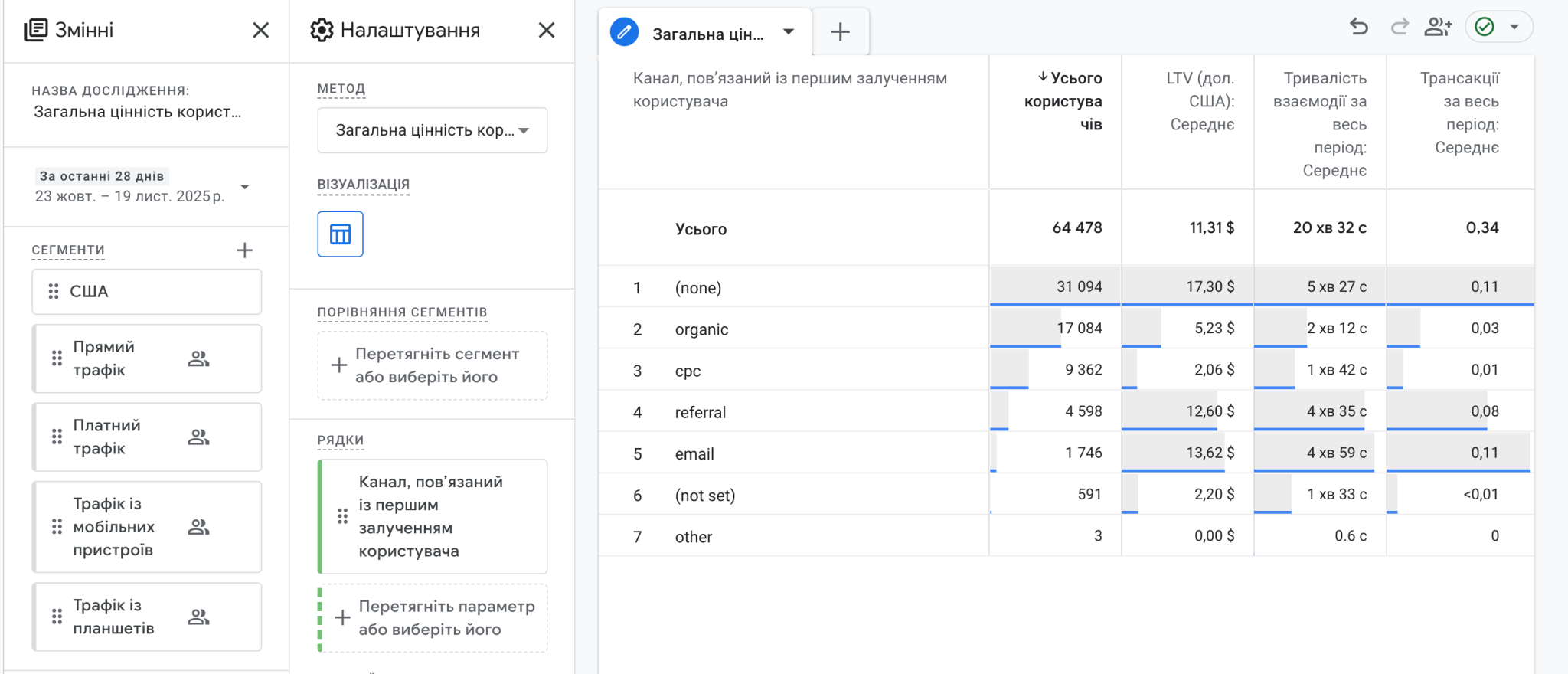
GA4 calculates LTV using device-based data. This means the metric is tied to a specific device rather than a unified user profile. If a person interacts with a product from multiple devices, GA4 counts them as separate users. In particular, key metrics for B2B SaaS provide a clearer picture of customer behavior and help teams make better decisions about growth and retention.
As a result, GA4 LTV works most accurately for mobile apps, where a stable user_id is typically used. This also explains why GA4 LTV often produces underestimated or unstable values for web projects.
The GA4 LTV calculation algorithm looks like this:
The result is a theoretical LTV that does not account for real cross-device behavior.
How to increase customer LTV depends on how effectively a business retains customers, increases repeat purchases, and improves the overall customer experience.
For most businesses, the most accurate approach is calculating LTV using a GA4–BigQuery integration. It provides access to all events, such as user_pseudo_id, user_id, purchase data, and traffic source, and allows you to define custom time windows.
This is the simplest calculation approach. It sums up all the revenue generated by each user and then calculates the average value. This method answers the question: How much revenue does one user generate on average over their entire lifetime with the product?
WITH purchases AS (


  SELECT


    user_id,// or user_pseudo_id


    SUM(event_value) AS total_revenue


  FROM `project.analytics_XXXXXX.events_*`


  WHERE event_name = 'purchase'


  GROUP BY user_id // or user_pseudo_id


)


SELECT


  AVG(total_revenue) AS ltv


FROM purchases
Cohort analysis in ecommerce helps marketers understand repeat purchases, customer retention, and changes in user behavior after the first purchase. For cohort analysis, you need to know when a user first interacted with the product.
In this approach:
WITH users AS (


  SELECT


    user_id,// or user_pseudo_id


    MIN(event_date) AS first_date


  FROM `project.analytics_XXXX.events_*`


  GROUP BY user_id // or user_pseudo_id


),


revenue AS (


  SELECT


    User_id, // or user_pseudo_id


    event_date,


    SUM(event_value) AS revenue


  FROM `project.analytics_XXXX.events_*`


  WHERE event_name = 'purchase'


  GROUP BY user_id, event_date


)


SELECT


  u.user_id,// or user_pseudo_id


  u.first_date,


  SUM(r.revenue) AS lifetime_revenue


FROM users u


LEFT JOIN revenue r USING (user_id) // or user_pseudo_id


GROUP BY u.user_id, u.first_date
One of the most valuable use cases for LTV is analyzing it by acquisition channels or traffic sources. This is where LTV directly affects marketing decisions. LTV and ROMI calculation helps businesses compare the long-term value of customers with the return generated by marketing investments.
In this calculation:
WITH first_touch AS (


  SELECT


    User_id, // or user_pseudo_id


    (SELECT value.string_value


      FROM UNNEST(event_params)


      WHERE key = 'source') AS source,


    MIN(event_date) AS first_date


  FROM `project.analytics_XXXX.events_*`


  GROUP BY user_id // or user_pseudo_id


),


revenue AS (


  SELECT


    User_id, // or user_pseudo_id


    SUM(event_value) AS revenue


  FROM `project.analytics_XXXX.events_*`


  WHERE event_name = 'purchase'


  GROUP BY user_id // or user_pseudo_id


)


SELECT


  source,


  AVG(revenue) AS avg_ltv


FROM first_touch ft


LEFT JOIN revenue r USING (user_id)


GROUP BY source


ORDER BY avg_ltv DESC;
Our Gainy user value case study shows how understanding user value can support better decisions about acquisition, retention, and business growth.
LTV is not a formal reporting metric or an abstract average. It is a decision-making tool that directly impacts investments and business scaling.
A correctly calculated LTV makes it possible to identify which channels and campaigns attract valuable users, not just traffic. It allows you to compare LTV with CAC and decide whether scaling is safe or detect unprofitable directions early on.
However, you need to remember that GA4 LTV is a device-based estimate. It works well for mobile apps but has clear limitations for web projects. For complex business models and web analytics, BigQuery becomes the only way to obtain a realistic LTV, accounting for user_id, cross-device behavior, traffic channels, and custom time windows.
At the same time, the SQL calculation itself is just the first step. LTV delivers the most value when used systematically, combined with segmentation by channels, cohorts, user types, or products. In this form, LTV transforms from a purely analytical metric into a practical tool for managing business growth.


“Livepage has proven to be a reliable source for rapid online growth. We started with 2,000 visitors per month. In 3 years together with Livepage we have reached 70,000 visitors and more than 100 leads from the site per month.”


“As for the results, we’ve been working together since 2015, and our traffic has increased 10x. I cannot say that Livepage was our first SEO company, but they have become the first SEO partner that helped us to achieve the success we were looking for.”


“Livepage delivers SEO efforts that have led to an increase in the site’s users, traffic, and conversions. The team uses a wide range of tools to achieve the client’s goals. They are attentive to the client’s needs, working with them in real-time and bringing in additional specialists when needed.”


“I am pleased with the quick task execution and the instant replies to my messages.”


“I like the complex approach that the Livepage team offers. Absolutely all team members work together; everyone is aware of what is happening on the project. We have one common goal – to increase our service sales, and the team is making every effort to achieve the goal as soon as possible.”


“We’ve been really impressed by how Livepage quickly understood our business and centred our PPC campaign around our objectives. We have achieved good results within a very short time in both revenue and ROI.”


“Everything is clear, timely, and understandable.”


“They have leveraged ideal opportunities to reach our business goals.”