




1 min reading
Review of Cooperation with Livepage from MISSIA Bridal



In a world where browsers are increasingly restricting the use of third-party cookies and advertising platforms demand more accurate, reliable data, businesses are encountering the concept of server-side GTM more frequently. For many companies, it’s no longer just a “trendy” tool but a necessity for quality analytics and effective advertising.
Let’s break down what server-side GTM is, how the technology works, and whether you actually need it.
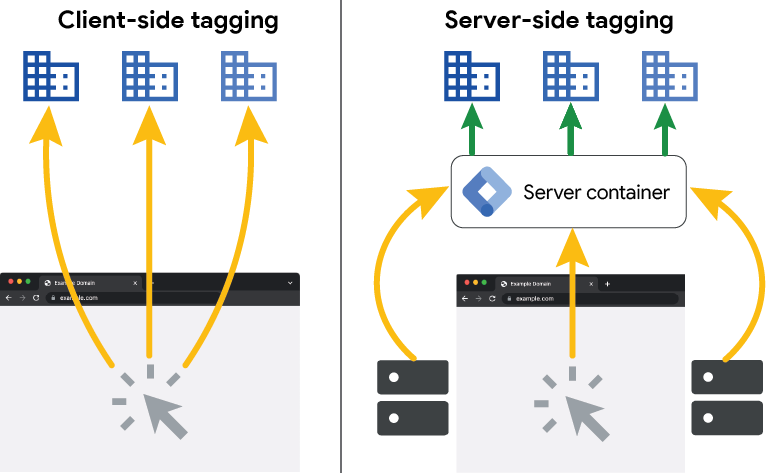
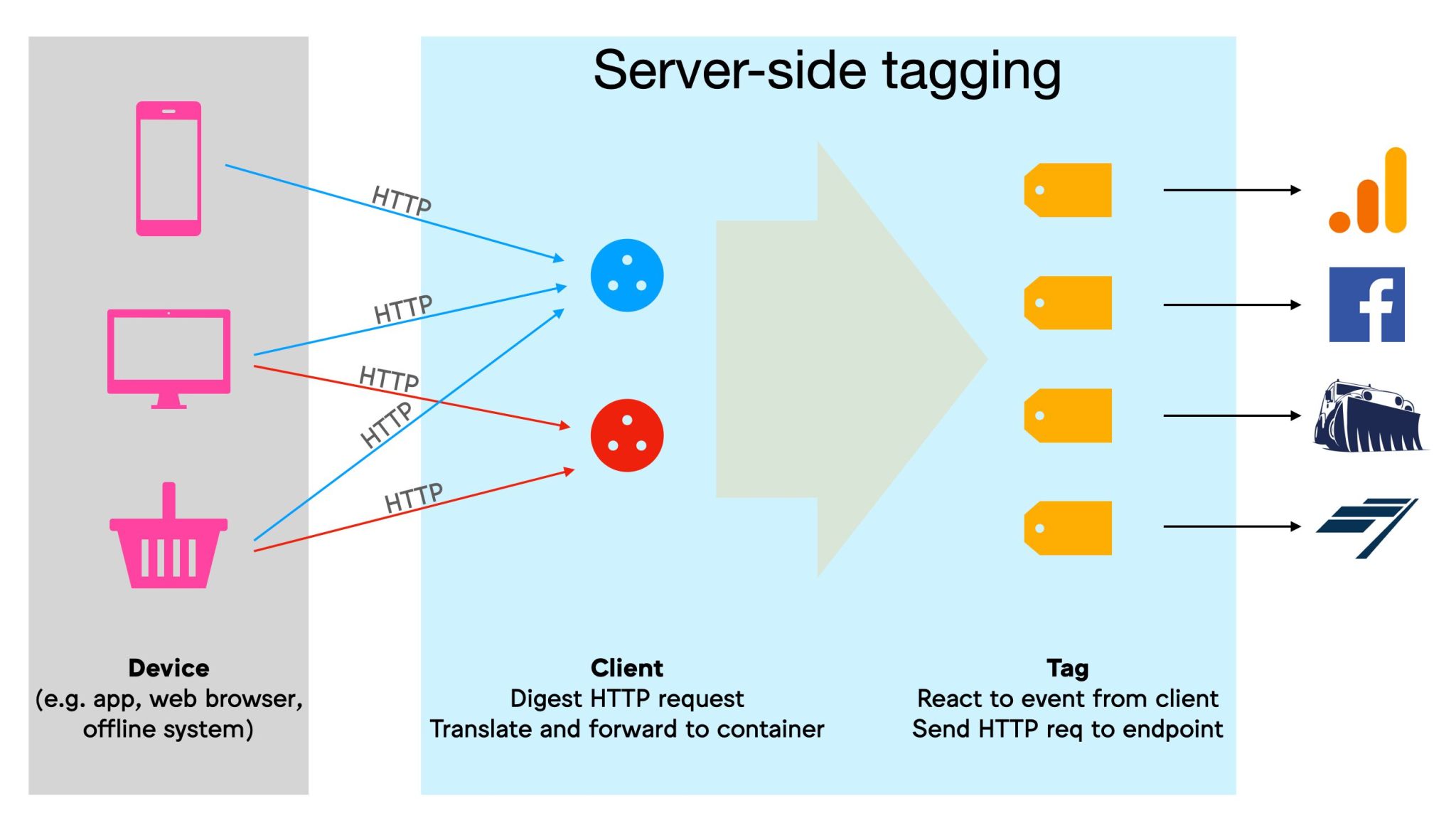
Server-side GTM is a modern web analytics technology that moves the collection and processing of marketing data from the user’s browser to a dedicated cloud server. Instead of loading a site down with dozens of third-party analytics scripts, the client’s device sends a single data stream to your server, which then distributes the information across analytics and advertising platforms.
It’s worth noting that classic Google Tag Manager runs directly in the user’s browser. The browser launches analytics scripts, passes events, activates advertising pixels, and sends data to systems like Google Analytics 4 or Google Ads. It handles the tasks marketers are familiar with. However, it has significant limitations:
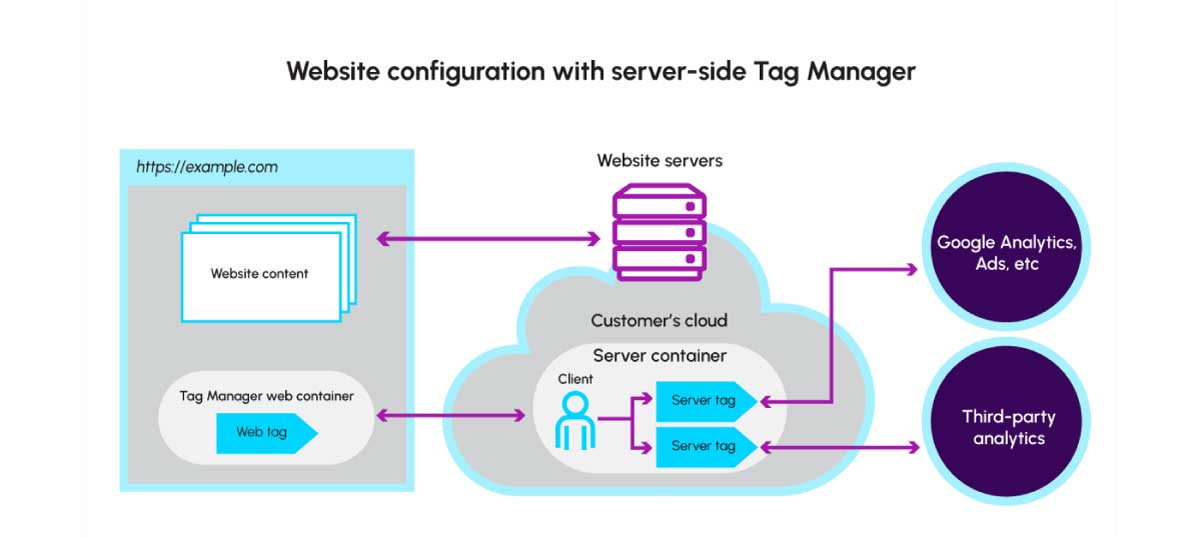
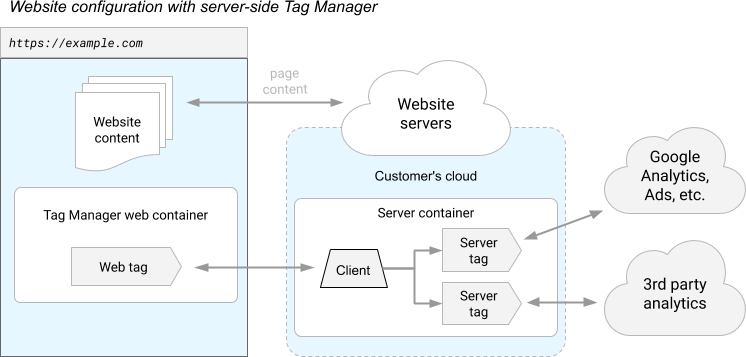
With server-side GTM, data doesn’t go directly to advertising systems — it first hits your own company server. There, it can be filtered, cleaned, transformed, or enriched before being passed on to analytics and advertising platforms like Google Analytics 4 and Meta Ads.
The architecture typically consists of two parts:
Cloud Run on Google Cloud Platform is the most common deployment option, though other infrastructure approaches are also available.
This approach gives you greater control over your data, more reliable tracking, and better alignment with modern data security and privacy requirements, which is exactly why more and more businesses are moving to a server-side tag manager.
When comparing GTM server-side vs. client-side, it’s important to understand the fundamental difference between the two approaches.
Client-side GTM runs entirely in the user’s browser. All tags, pixels, and tracking code load on the client side. It’s simpler to set up but less reliable in the face of modern browser restrictions.
Server-side tagging shifts much of the logic to the server. The browser sends data to your server endpoint, and the server then communicates with advertising and analytics platforms.
The result for businesses:
For many companies, the question is no longer whether they need server-side tracking, but rather how to use GTM server-side effectively.
When configured correctly, you’ll receive more accurate data, and conversion delivery to Google Ads and Meta Ads becomes more stable. Server-side data processing reduces event loss caused by browser restrictions and ad blockers. First-party cookies also persist longer, improving user identification.
If you’re dealing with ad platform data discrepancies, server-side tracking may be worth considering as a way to reduce event loss and improve data consistency.
Another key advantage is control over exactly what data is sent and where. The server-side tag manager approach allows you to anonymize data, filter events, mask personal parameters, manage consent logic, and restrict the transmission of sensitive information.
As data privacy regulations tighten, this has become critically important for many businesses and a core part of the benefits of server-tracking.
sGTM helps reduce the load on the user’s device by moving part of the data processing logic from the browser to the server, which can result in faster site loading. Fewer third-party tags and analytics scripts in the browser positively impact page speed, UX, and SEO performance. This is one of the most underrated benefits of Google server-side tagging.
sGTM is frequently used as the backbone for modern advertising and analytics implementations:
Without a server-side architecture, many of these solutions either perform unreliably or aren’t available at all.
Despite all the server-side GTM benefits, it’s not a free solution. Unlike classic GTM, it requires a separate server infrastructure — so businesses need to factor in server costs, infrastructure maintenance, and technical administration.
Unlike web GTM, a server-side setup demands deeper technical knowledge. Implementation requires ongoing monitoring, configuration updates, testing, and debugging.
The server-side tag manager interface may look similar to browser-based GTM on the surface, but the underlying logic is quite different. Instead of the familiar data layer, the server-side setup revolves around HTTP requests. New concepts also come into play (clients and transformations), which your team will need to learn.
It’s also worth noting that not every service is equally ready for server-side tracking. Even if you’ve completed all the foundational steps — configured your server, allocated a monthly budget, and gotten up to speed on what is server-side tagging — limitations can still arise depending on the platforms you want to integrate with.
The good news is that major platforms have long adapted to this model. Systems like Google Analytics 4, Google Ads, Meta, TikTok, and LinkedIn not only support server-side tracking but actively recommend it.
Many people’s first question is about GTM server-side cost. It’s not free, but that doesn’t mean implementation will be prohibitively expensive. The exact figure depends on several factors: your type of business, traffic volume, and the tasks you want to solve.
You’ll need a server to run sGTM. This can be your own infrastructure or a ready-made service on a cloud platform. For a small site or project with moderate traffic, infrastructure typically runs around €10–20 per month.
For mid-sized businesses with active advertising and a steady stream of events, the budget usually falls in the €30–60 per month range.
For high-traffic sites, marketplaces, or large-scale eCommerce operations, costs are calculated individually based on data volume and load.
Setup is a separate consideration. Server-side GTM is more complex than standard browser-based GTM, so initial implementation tends to cost more — though it’s a one-time investment. The exact price depends on how many platforms need to be connected, whether a CRM is involved, and whether additional features like data validation or consent logic are required.
There’s also ongoing maintenance to consider. Some companies handle this internally; others work with an analyst or agency. It doesn’t have to be a major monthly expense, but it’s important to understand that server-side GTM is an infrastructure that needs to be actively managed.
That’s why the benefits of Google server-side tagging should always be evaluated not in isolation, but in the context of your business goals and the potential impact on advertising performance.
The budget alone isn’t a measure of viability. Server-side GTM only makes sense when it genuinely helps your business solve real problems (not just because it’s recommended).
If your analytics stack also includes product analytics, an Amplitude analytics setup may require its own event-planning and data-quality considerations alongside server-side tracking.
The most common server-side GTM use cases are tied to data loss or unreliable tracking (for example, when a portion of conversions never reach advertising systems, or when data doesn’t match across platforms).
One of the most common scenarios is stable event delivery to Meta via the Conversion API, along with reliable conversion tracking in Google Ads, including Enhanced Conversions. This is especially relevant for iOS audiences and browsers with strict cookie restrictions. The shift toward analytics without cookies puts greater emphasis on first-party data, consent management, and alternative measurement methods.
Another popular use case is improving data quality in Google Analytics 4. A server-side tag manager allows you to send events to GA4 with fewer losses and to filter or transform data before it enters the system, resulting in more stable, analysis-ready numbers.
For businesses with CRMs, it’s also a way to connect the entire data chain: from a site lead through to a sale, tied to both advertising and analytics. This is where scenarios involving offline conversions, call tracking, and form leads that aren’t processed instantly become possible.
And finally — control. In the age of GDPR and consent banners, sGTM gives you precise control over what data is sent, when, and where — rather than relying solely on the user’s browser behavior.
By using custom templates in Google Tag Manager, teams can standardize tag configurations and make them easier to maintain across different projects.
Answer yes or no:
Results:
You can also explore our Apriorit case study for an example of how a company approaches its analytics and tracking needs.
Today, server-side GTM is no longer a niche solution reserved for large enterprises. As browser restrictions tighten, privacy policies evolve, and the bar for analytics quality rises, the server-side approach is gradually becoming the new standard for digital marketing.
That said, it’s worth implementing only when your business is genuinely dealing with data loss, unreliable tracking, or a real need for deeper analytics.
Whatever your next step may be, the Livepage team is ready to help you design and implement a robust server-side tag manager to ensure more accurate, stable data.


“Livepage has proven to be a reliable source for rapid online growth. We started with 2,000 visitors per month. In 3 years together with Livepage we have reached 70,000 visitors and more than 100 leads from the site per month.”


“As for the results, we’ve been working together since 2015, and our traffic has increased 10x. I cannot say that Livepage was our first SEO company, but they have become the first SEO partner that helped us to achieve the success we were looking for.”


“Livepage delivers SEO efforts that have led to an increase in the site’s users, traffic, and conversions. The team uses a wide range of tools to achieve the client’s goals. They are attentive to the client’s needs, working with them in real-time and bringing in additional specialists when needed.”


“I am pleased with the quick task execution and the instant replies to my messages.”


“I like the complex approach that the Livepage team offers. Absolutely all team members work together; everyone is aware of what is happening on the project. We have one common goal – to increase our service sales, and the team is making every effort to achieve the goal as soon as possible.”


“We’ve been really impressed by how Livepage quickly understood our business and centred our PPC campaign around our objectives. We have achieved good results within a very short time in both revenue and ROI.”


“Everything is clear, timely, and understandable.”


“They have leveraged ideal opportunities to reach our business goals.”