




9 min reading
How Web Design Impacts Customer Experience


First-party tracking is often presented as a solution to almost every problem in modern web analytics: third-party cookie restrictions, Safari ITP, AdBlock, attribution loss, and even users rejecting cookies. But in reality, things are a little more complicated.
First-party tracking for analytics can indeed make data collection more reliable and give businesses more control over their analytics infrastructure. However, it doesn’t eliminate browser restrictions, let you ignore user consent, or guarantee that 100% of your data will be collected.
In this article, we explain what is first-party tracking, how it works, and its actual limitations.
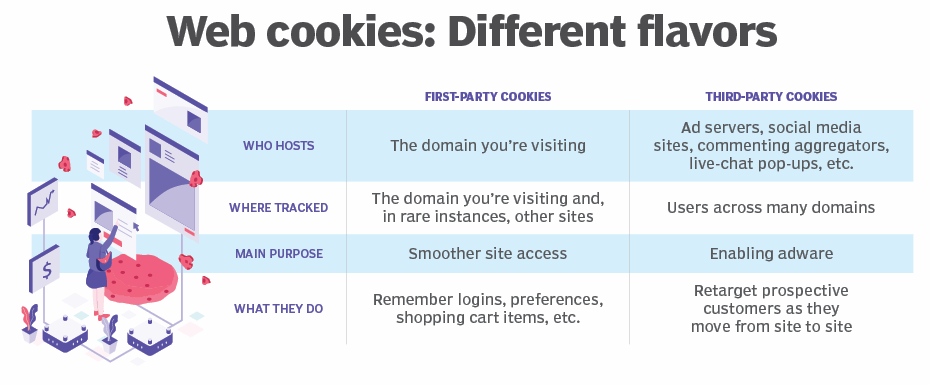
In simple terms, first-party tracking means collecting data within the context of the domain a user visits directly.
For example, a user visits example.com. The website can set its own cookies for example.com, store a session or user identifier, and use it during future interactions with the website. These are first-party cookies because they belong to the website the user is currently visiting.
By comparison, a third-party cookie belongs to another domain and is used within the context of a different website — for example, by an advertising or technology platform.
This cross-site use of identifiers is one of the main reasons third-party cookies have become a target of modern browser privacy restrictions. This is also the key distinction when comparing first-party tracking vs third-party cookies: first-party tracking operates within the context of the website itself, while third-party tracking traditionally relies more heavily on identifiers being shared or accessed across different websites.
Now let’s look at one of the most common first-party data tracking myths — implementing server-side GTM is required before you can use first-party tracking in GA4.
It is not.
Standard Google Analytics 4 already uses first-party cookies. For example, the _ga cookie stores an identifier associated with the GA4 Client ID, which helps Google Analytics distinguish users and their interactions.
This means that a setup like Website → GTM → GA4 can already use first-party cookies. Server-side tagging can extend and improve a first-party measurement architecture, but the two concepts are not the same.
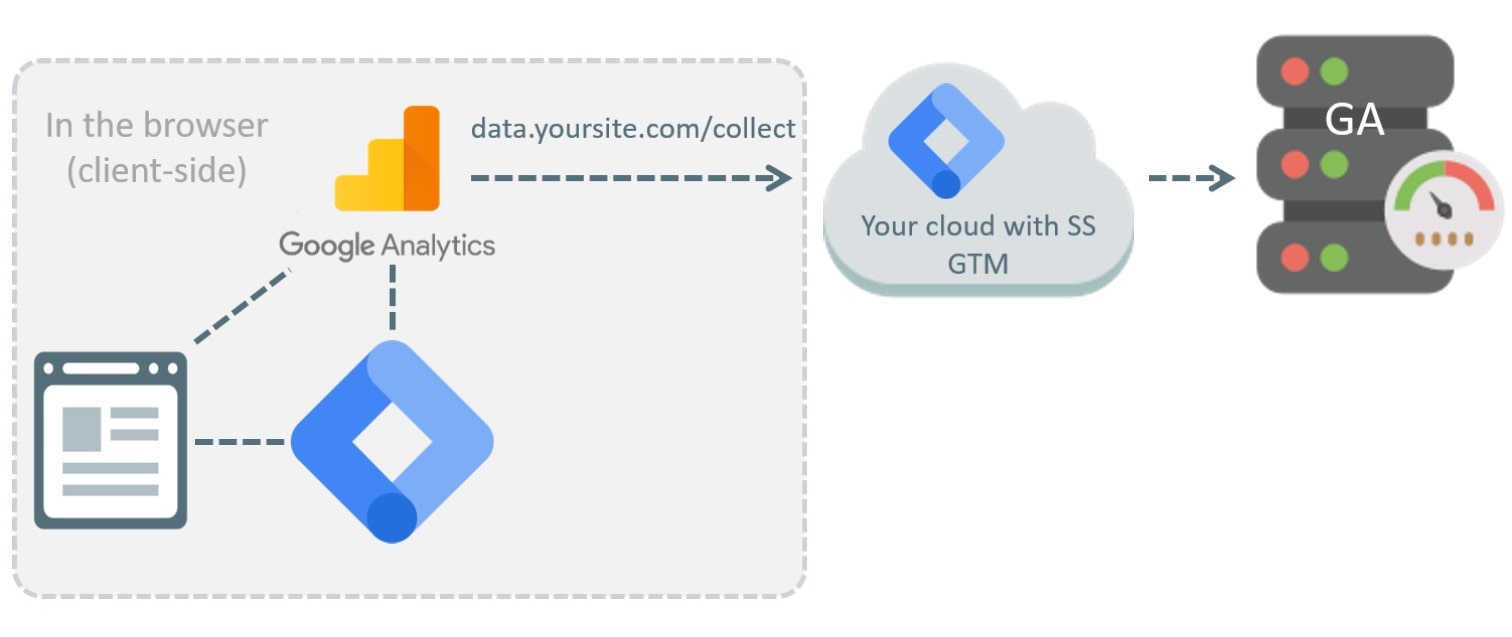
With traditional client-side tracking, much of the analytics logic runs directly in the user’s browser:
Browser → Google Analytics
With server-side tagging, an additional server layer is introduced between the browser and analytics or advertising platforms:
Browser → your server endpoint → GA4 / Google Ads / Meta
For example, a server-side GTM container can operate through a subdomain such as analytics.example.com. This gives businesses more control over which data is received, transformed, and eventually sent to external platforms.
Google also develops similar first-party approaches through Google Tag Gateway, where the Google tag and measurement requests can be served or routed through infrastructure associated with the website’s own domain.
This is why first-party tracking and server-side GTM are frequently discussed together. However, they should not be treated as synonyms. First-party tracking with GTM can exist without a server-side container, while server-side GTM is an infrastructure layer that can provide additional control over the measurement process.
Another common misconception about how first-party tracking works is to treat any server-to-server data transfer as first-party tracking.
For example, a company may send a purchase event directly from its backend using the GA4 Measurement Protocol. That is a server-to-server data transfer. However, this alone tells us very little about the website’s overall tracking architecture.
In real-world projects, several mechanisms are often combined. Thus, one data flow can look like this:
Browser → first-party cookie → server-side GTM → GA4
At the same time, you can have a separate data flow running in parallel:
Backend / CRM → server-side endpoint → GA4 or advertising platforms
For this reason, it is usually more useful to think in terms of a first-party measurement architecture rather than a single tracking technology.
The relationship between first-party tracking and cookie consent is often misunderstood, while it’s probably the most important limitation.
A first-party cookie does not automatically become “optional” just because it is first-party. From a privacy perspective, what matters is not only who sets the cookie but also what it is used for and what data it collects.
For example, in Google Consent Mode, the analytics_storage parameter controls whether analytics storage is allowed. If analytics storage is denied, GA4 does not store the Client ID in the _ga cookie.
Therefore, moving tracking to your own domain does not automatically make it exempt from consent requirements. The same applies to server-side GTM. It helps enforce data collection and transmission rules based on consent status, but it does not override a user’s decision.
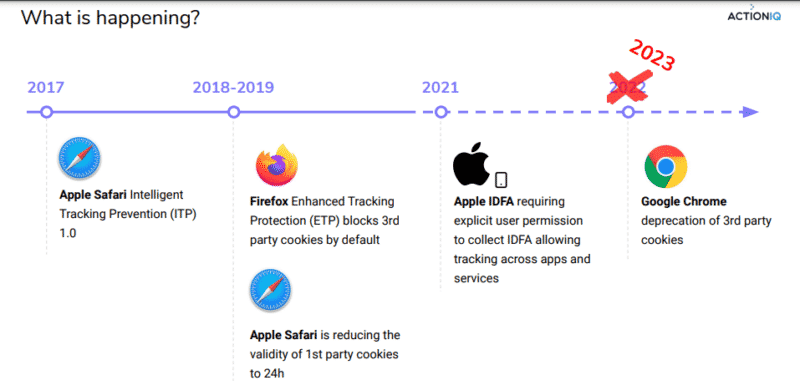
First-party tracking can help reduce some of the problems associated with third-party cookies. However, that does not mean first-party cookies are completely protected from browser restrictions.
Safari, for example, uses Intelligent Tracking Prevention (ITP).
WebKit restricts script-writable storage, so cookies created with JavaScript and other browser storage can have shorter lifetimes in certain cases. Safari also looks for techniques such as CNAME cloaking, where third-party tracking systems are routed through what appears to be a first-party subdomain.
This means that ITP and first-party cookies are related, as browser privacy mechanisms can still affect first-party identifiers. The exact Safari cookie lifetime also depends on how the cookie was created and the context in which it was used.
Therefore, “first-party” does not mean an unlimited cookie lifetime.
This is where server-side architecture and an HTTP first-party cookie may provide certain advantages compared with an entirely client-side setup. However, describing such implementations as a complete “ITP bypass” would be misleading.
A properly designed first-party tracking architecture can:
This is particularly useful for businesses where web analytics is no longer limited to installing a few tracking tags in the browser. It can also provide a better foundation for user identification in analytics, especially when businesses need to connect browser interactions with authenticated users, CRM records, or backend events.
At the same time, data collection without third-party cookies should not be confused with unrestricted data collection. Removing a dependency on third-party cookies does not remove privacy, consent, or browser-level limitations.
Moving toward first-party tracking should not be viewed as a way to “bypass privacy restrictions.” It is better described as a gradual change in measurement architecture.
Instead of relying on a model where the browser communicates directly with multiple external platforms, businesses can gain more control over their identifiers, data flows, and rules for sending information to third parties.
But browser restrictions, consent requirements, AdBlock, and privacy regulations do not disappear. These are the main first-party tracking limitations to keep in mind.
If you have questions about first-party tracking or its implementation, contact the Livepage team to discuss the approach that best fits your project.


“Livepage has proven to be a reliable source for rapid online growth. We started with 2,000 visitors per month. In 3 years together with Livepage we have reached 70,000 visitors and more than 100 leads from the site per month.”


“As for the results, we’ve been working together since 2015, and our traffic has increased 10x. I cannot say that Livepage was our first SEO company, but they have become the first SEO partner that helped us to achieve the success we were looking for.”


“Livepage delivers SEO efforts that have led to an increase in the site’s users, traffic, and conversions. The team uses a wide range of tools to achieve the client’s goals. They are attentive to the client’s needs, working with them in real-time and bringing in additional specialists when needed.”


“I am pleased with the quick task execution and the instant replies to my messages.”


“I like the complex approach that the Livepage team offers. Absolutely all team members work together; everyone is aware of what is happening on the project. We have one common goal – to increase our service sales, and the team is making every effort to achieve the goal as soon as possible.”


“We’ve been really impressed by how Livepage quickly understood our business and centred our PPC campaign around our objectives. We have achieved good results within a very short time in both revenue and ROI.”


“Everything is clear, timely, and understandable.”


“They have leveraged ideal opportunities to reach our business goals.”