




9 min reading
How Web Design Impacts Customer Experience


Your Facebook or Instagram campaigns are generating leads and sales you can clearly see in the CRM, but the reported conversion numbers in Meta Ads Manager are much lower? This is one of the most common problems in digital marketing today. In many cases, the issue is not poor ad performance but lost tracking data caused by browser restrictions, iOS privacy changes, ad blockers, cookie consent settings, and the technical limitations of Facebook Pixel.
That is where Meta Conversions API (Meta CAPI) comes in. Instead of relying only on data sent through the browser, CAPI can send event information directly to Meta’s servers. This helps reduce tracking gaps and gives Meta a more complete picture of campaign results.
So, if you are trying to understand why Facebook underreports conversions, browser-based tracking limitations are often the main reason.
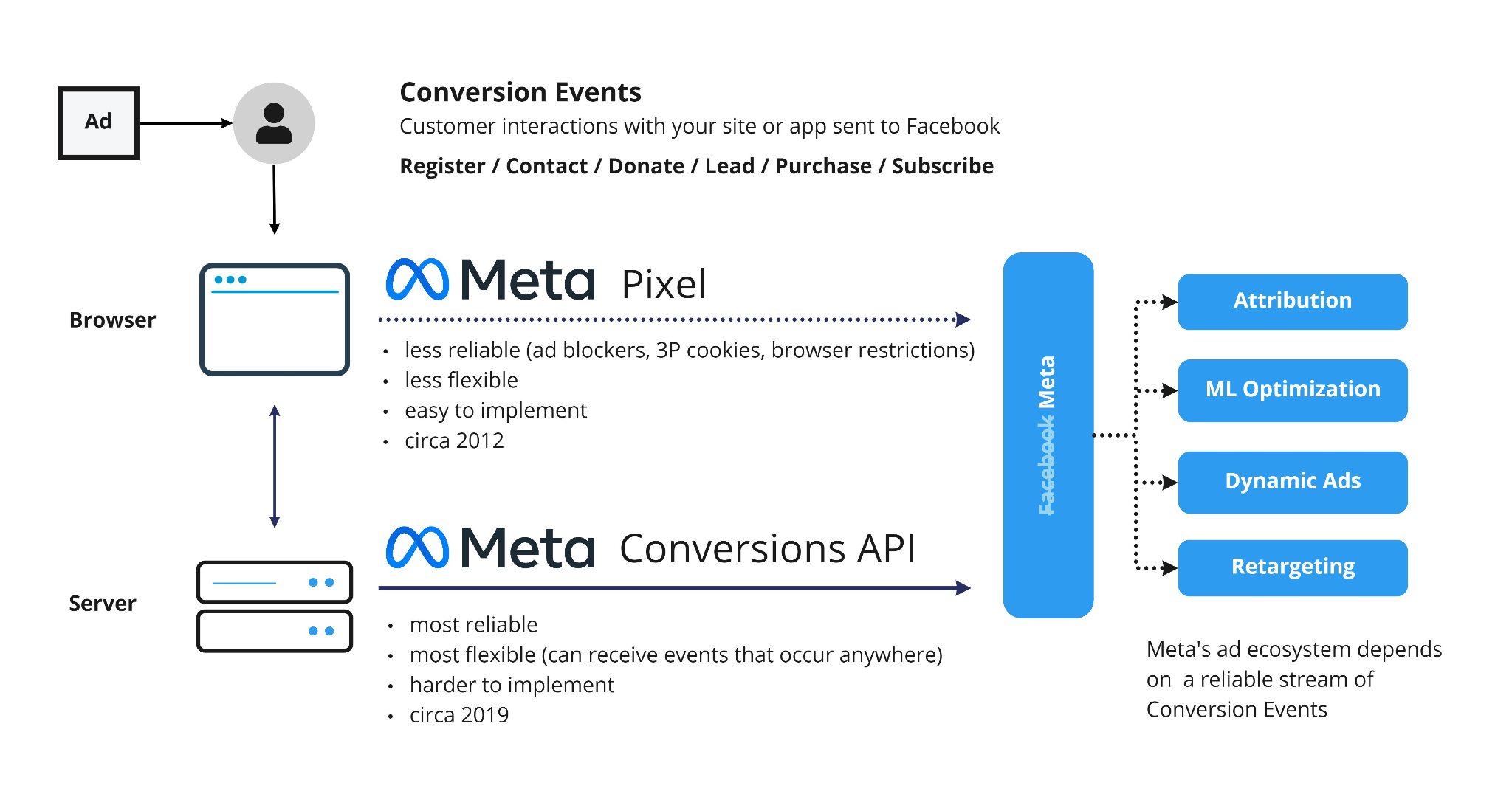
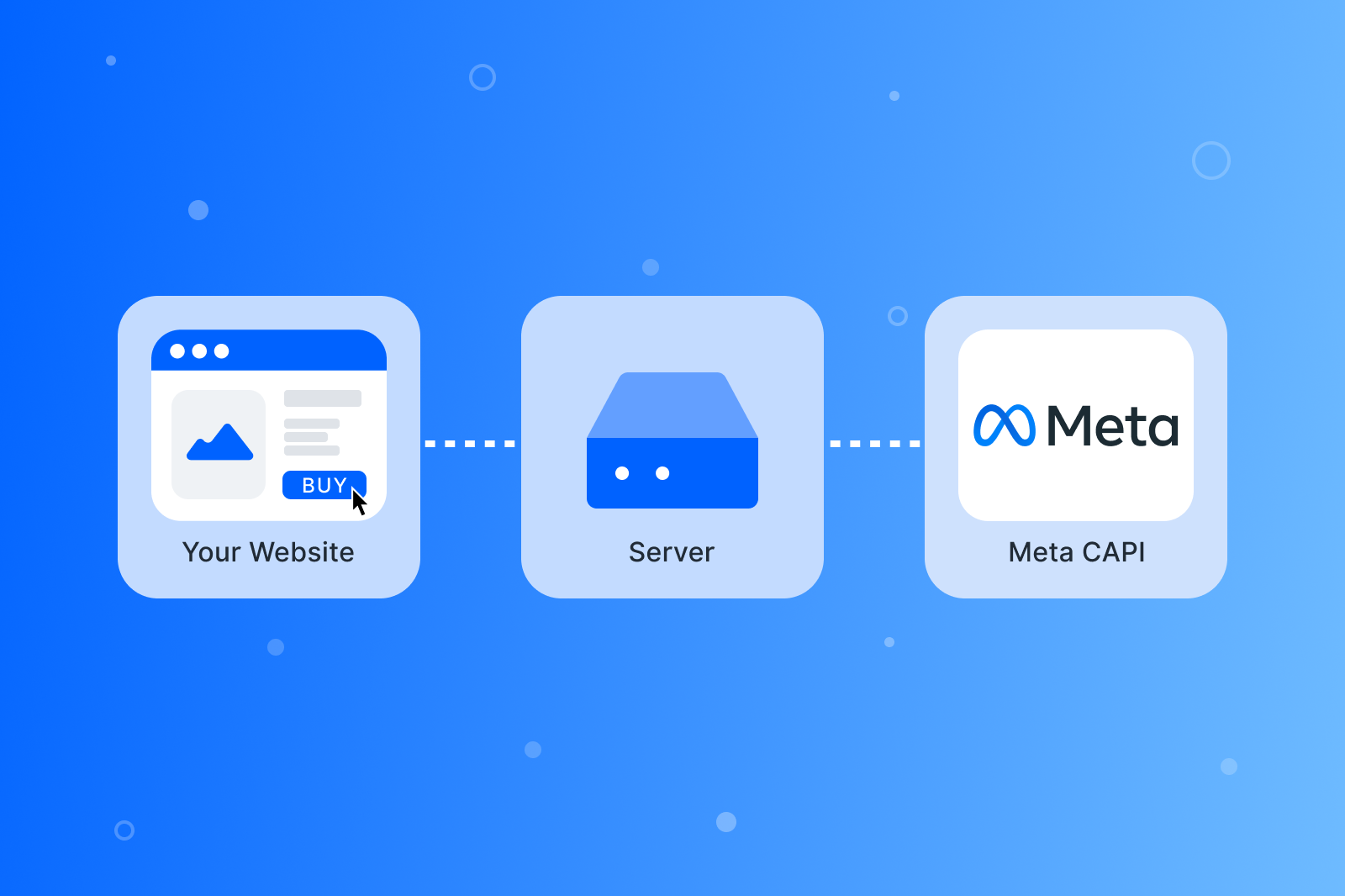
Meta CAPI is a server-side tracking technology that sends event and conversion data directly from your backend, CRM, or server to Meta.
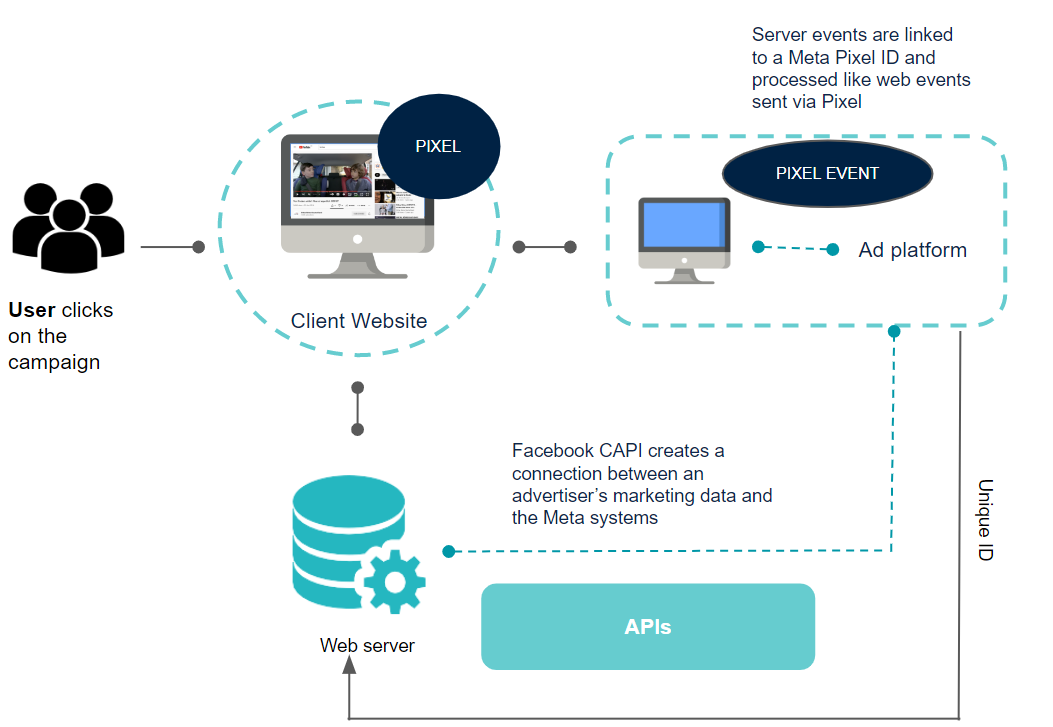
A standard Meta Pixel works like this: User → Browser → Facebook.
Meta CAPI works differently: User → Your Server/CRM → Facebook.
Because the data is sent from the server side, tracking is less affected by browser tracking limitations, blocked cookies, and other user-side restrictions. As a result, Meta can receive more complete information about what users do after interacting with your ads.
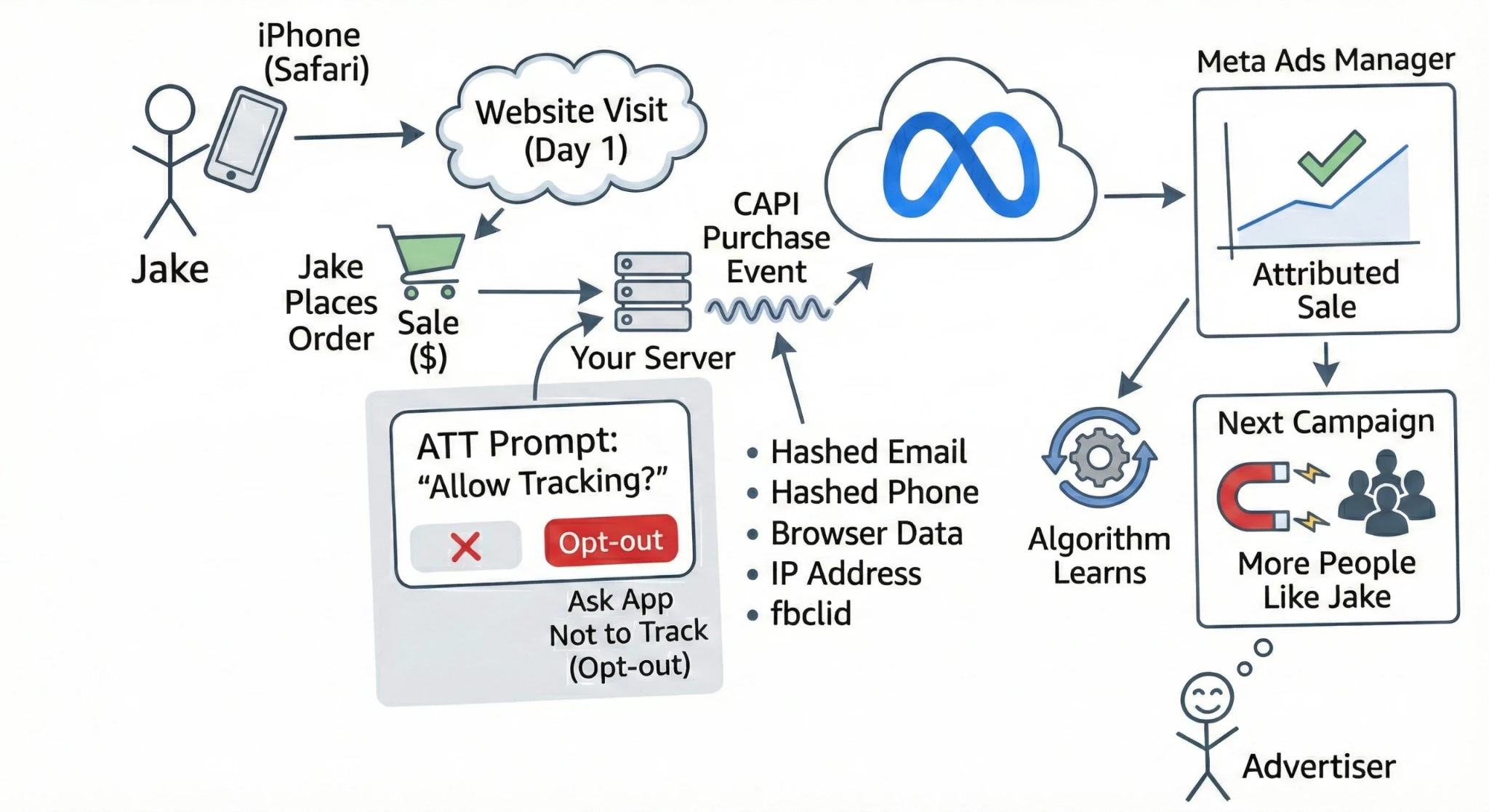
A few years ago, Meta Pixel was much more reliable at tracking what users did after visiting a website. Since then, browser privacy restrictions have become stricter, Apple has introduced App Tracking Transparency, and users have gained more control over whether they allow cookies and tracking.
Suppose someone clicks an Instagram ad, visits the website, and fills out a form. The lead appears in the CRM, but Facebook never receives the conversion event. Ads Manager then reports weaker campaign performance even though the advertising actually produced a real lead. This is one of the main reasons Facebook conversion campaigns often appear to perform worse than CRM and sales data suggests.
One reason is that Safari and iOS restrict certain cookies and advertising identifiers by default. Ad blockers and cookie consent tracking choices can reduce tracking even further. When those restrictions apply, browser-based events may never reach Meta.
Sometimes tracking fails even without additional privacy restrictions. If a user closes the page quickly, switches tabs, or has an unstable internet connection, the browser event may not have enough time to reach Meta.
There is also a large category of conversions that happen offline or later in the sales process. A person may submit a form today and complete a purchase over the phone tomorrow. The sale exists in the CRM, but Meta may have no way to connect it with the original ad interaction.
As a result, businesses often see discrepancies between CRM data and Meta Ads Manager, leaving them with an incomplete picture of campaign performance.
The main advantage of Meta CAPI vs Pixel is that the advertising platform receives more complete data about how users interact with your website. Some purchases, inquiries, and leads that were previously lost because of browser restrictions can once again be recorded in Meta Ads Manager. As a result, campaign reporting becomes closer to the actual data the business sees internally.
In many cases, implementing CAPI can increase the number of recorded events by around 10–20%. The actual improvement varies depending on the industry, website setup, and user behavior. The biggest improvement is usually seen by businesses with a large share of mobile traffic or users browsing through Safari.
Important! CAPI does not generate additional sales or leads by itself. Its role is to help Meta capture conversions that were already happening but were previously missed by browser-based tracking.
The value of CAPI goes beyond more accurate reporting. It also provides Meta’s algorithms with better data for its optimization algorithms.
When the system has a better understanding of which users actually make purchases or submit inquiries, it can identify similar audiences more effectively and optimize ad delivery accordingly. Facebook ad attribution quality therefore has a direct impact on campaign optimization. If Meta can connect more conversions with the ads that influenced them, it can make more informed decisions about budget allocation.
With stronger conversion signals, businesses may see improvements in CPA, ROAS, and the overall consistency of campaign performance.
The rules around user data have changed significantly over the past few years. Safari, Firefox, and other browsers continue to tighten restrictions on client-side tracking, while cookie consent banners, ad blockers, and other privacy tools add even more limitations.
This is one reason more companies are adopting server-side tracking. By sending events directly from the server, businesses can reduce their dependence on browser technology and create a more consistent flow of marketing data. This approach can’t be used as a Facebook Pixel alternative, but it can help recover some of the data that would otherwise be lost through browser-based tracking.
A customer journey does not always end with an online checkout. In many businesses, a customer first submits a lead form, then speaks with a sales representative who provides a consultation, confirms the details, or closes the deal later in the CRM. In these situations, standard browser tracking may not be able to connect the final purchase with the original ad interaction.
With Meta CAPI, businesses can send those offline conversions to Meta. These may include confirmed sales, successful phone consultations, signed contracts, or paid orders completed after follow-up from a sales representative.
There are several ways to implement the Meta Conversions API. The best approach depends on your CMS, technical infrastructure, data volume, and how much control the business needs over data transmission.
For smaller websites, ready-made integrations are usually enough. Larger eCommerce stores or projects with more complex analytics often choose server-side solutions or a direct API integration.
Let’s look at the three most common options.
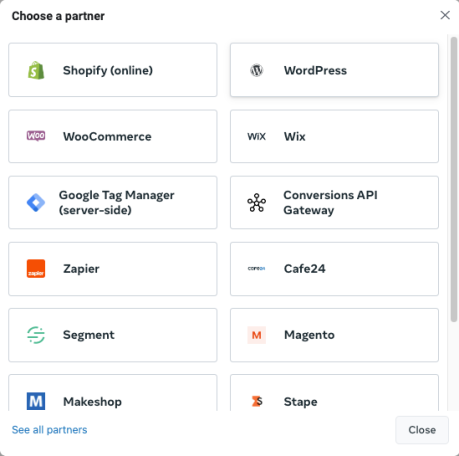
This is the easiest way to set up Meta CAPI. Many popular platforms already offer built-in integrations, so implementation is relatively quick and does not require complex development.
Many major platforms already provide native or official integrations, including:
In most cases, you only need to install an official plugin or enable the built-in integration. After that, the platform can begin sending events to Meta automatically. For smaller businesses, this is a fast and cost-effective way to improve tracking quality.
However, ready-made integrations come with limitations. They do not always provide full control over event logic, custom tracking scenarios, or more complex business processes.
That is why growing companies move toward more flexible server-side or direct API solutions later.
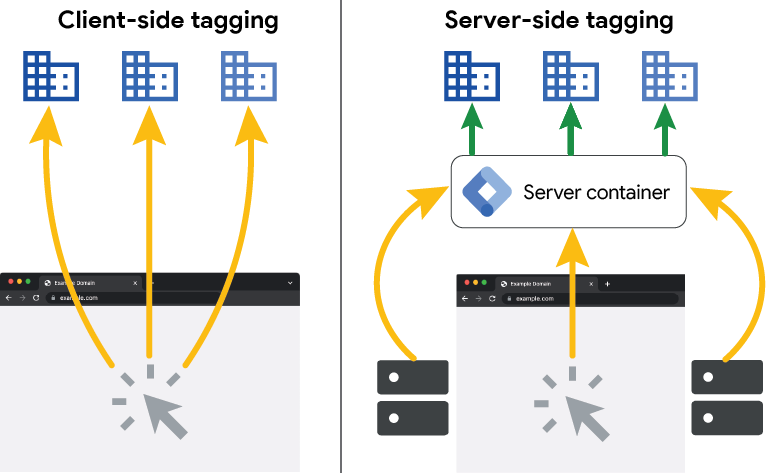
GTM Server-Side has become one of the most popular approaches to server-side tracking, especially among eCommerce businesses and companies that want more control over how their marketing data is processed. With this setup, a separate server container sits between the website and advertising platforms. Events pass through this container before being sent to Meta, GA4, and other systems.
A typical architecture includes:
The main advantage of this approach is greater control over data. Businesses can remove unnecessary parameters from events, enrich them with their own data, and manage data transmission to multiple marketing platforms from one centralized environment. This makes GTM Server-Side tracking a popular option for companies that want to improve Facebook conversion tracking while also building a more reliable tracking infrastructure overall.
After implementation, it is important to check whether all events are reaching Facebook Events Manager correctly. This tool helps identify errors, test event transmission, and confirm that the integration is working as expected. You should also monitor Event Match Quality, which indicates how effectively Meta can match events with users. If necessary, this can be improved through Enhanced Matching.
However, this type of implementation requires experience with server infrastructure, DNS, and Google Tag Manager containers. For that reason, setup is usually handled by technical specialists.
The most flexible option is a direct API integration. Instead of relying on a plugin or intermediary platform, events can be sent directly from internal systems such as:
This approach is most common among larger organizations that need precise control over how marketing data is collected, processed, and sent to Meta.
A direct integration allows the business to define:
Another major advantage is the ability for offline or CRM conversion tracking for Meta. That is, Meta can receive information about confirmed sales, completed deals, or other events that become available only after internal verification. However, to prevent the same event from being counted twice, event deduplication must be implemented. This allows Meta to recognize when the same action has been received through both Pixel and the server and count it only once.
This is one of the most advanced ways to implement Facebook CAPI because the company controls the entire data transmission process and can customize it around its own business logic. At the same time, this is also the most technically complex implementation method. It requires backend developers, a well-designed architecture, thorough testing, and ongoing data quality monitoring.
For some companies, Meta CAPI is simply a way to improve analytics quality. For others, it has become essential for accurately evaluating ad performance. The conversions API is especially valuable for businesses with high traffic volumes, long sales cycles, or a large share of mobile users. In these cases, lost data can have a much bigger impact on campaign measurement and optimization.
eCommerce businesses heavily depend on accurate conversion data. A customer may browse products today, return tomorrow from another device, add items to the cart later, and complete the purchase only after several days. During that journey, some interaction data can be lost because of browser restrictions or privacy policies. As a result, Meta Ads Manager may fail to record all the Facebook conversions that the campaigns actually generated.
That is why more online stores are adopting server-side event tracking to get a more complete picture of advertising performance.
If acquiring a single customer costs hundreds or even thousands of dollars, even a small amount of lost data can lead to poor business decisions. If Meta does not receive data about some completed sales, optimization algorithms work with incomplete signals, and marketers have a harder time identifying which campaigns are actually delivering results.
In these cases, investing in a reliable analytics setup can pay off quickly by making ad performance measurement much more accurate.
Apple’s privacy updates have reduced the amount of marketing data available through traditional browser tracking, particularly on iOS. Therefore, if a large percentage of your audience uses iPhones or Safari and you need iOS tracking for Facebook Ads, you may see a clear difference between real sales and the conversions recorded in Meta Ads Manager. In this case, server-side event tracking can help recover some of the missing data and make reporting more reliable.
Comparing Meta data with your CRM is one of the easiest ways to spot tracking problems. If your CRM consistently shows more leads or completed sales than Ads Manager, it is a strong indication that some events are likely being lost before they reach the advertising platform.
The first step should be to review the current tracking setup and identify where those gaps occur.
Today, Meta Pixel alone is no longer enough for reliable marketing analytics. Browser restrictions, cookie blocking, and stronger privacy protections can prevent advertising platforms from receiving a significant portion of user data. As a result, businesses see incomplete reporting, while Meta’s algorithms have fewer signals to optimize campaigns effectively.
That is why Meta Conversions API has become an important part of a modern tracking setup. It helps businesses:
If your CRM regularly shows more leads or sales than Meta Ads Manager, or you are unsure whether your current tracking setup is accurate, Livepage can help. Our team can audit your analytics, implement Meta CAPI, and configure event tracking around your business needs.


“Livepage has proven to be a reliable source for rapid online growth. We started with 2,000 visitors per month. In 3 years together with Livepage we have reached 70,000 visitors and more than 100 leads from the site per month.”


“As for the results, we’ve been working together since 2015, and our traffic has increased 10x. I cannot say that Livepage was our first SEO company, but they have become the first SEO partner that helped us to achieve the success we were looking for.”


“Livepage delivers SEO efforts that have led to an increase in the site’s users, traffic, and conversions. The team uses a wide range of tools to achieve the client’s goals. They are attentive to the client’s needs, working with them in real-time and bringing in additional specialists when needed.”


“I am pleased with the quick task execution and the instant replies to my messages.”


“I like the complex approach that the Livepage team offers. Absolutely all team members work together; everyone is aware of what is happening on the project. We have one common goal – to increase our service sales, and the team is making every effort to achieve the goal as soon as possible.”


“We’ve been really impressed by how Livepage quickly understood our business and centred our PPC campaign around our objectives. We have achieved good results within a very short time in both revenue and ROI.”


“Everything is clear, timely, and understandable.”


“They have leveraged ideal opportunities to reach our business goals.”