



1 min reading
Review of Cooperation with Livepage from MISSIA Bridal


Many companies evaluate advertising effectiveness by one number — the number of leads. At first glance, this seems reasonable, but in practice, things are much more complicated.
Imagine that an advertising campaign generated 100 conversions, such as completed forms on the website. On the surface, that looks like a strong result. But after the sales team processes those inquiries, 15 turn out to be spam, 40 do not fit the ideal customer profile, and another 30 are interested but cannot move forward because of pricing, terms, or other conditions. In the end, only 15 become actual customers.
For the business, those 15 deals are what really matter. But Google Ads does not know that.
From the advertising platform’s perspective, all 100 leads look equally successful because every user completed the target action by submitting a form or leaving their contact details. If you do not send Google information about which inquiries actually became customers, its algorithms will continue optimizing campaigns for any conversion rather than for the leads that generate real revenue.
That is why more companies are implementing an offline conversions campaign in Google Ads. Instead of teaching the algorithm what a lead looks like, you can start teaching it what a good lead and, eventually, a real customer look like.
At Livepage, we use this approach for projects where the sale does not happen immediately after the click. By connecting advertising data with what happens later in the sales process, we can optimize toward offline lead quality in Google Ads rather than simply increasing the conversion counter.
Offline conversions allow Google Ads to receive information about user actions that happen after someone interacts with your website. Most often, this includes actions such as lead qualification by a sales manager, order confirmation, contract signing, or a completed sale.
Simply put, Google Ads receives information not only that a person submitted a form but also about what happened to that lead afterward. That means the platform can learn whether the lead was qualified, whether an order was confirmed, whether a contract was signed, or whether the opportunity ultimately became a sale.
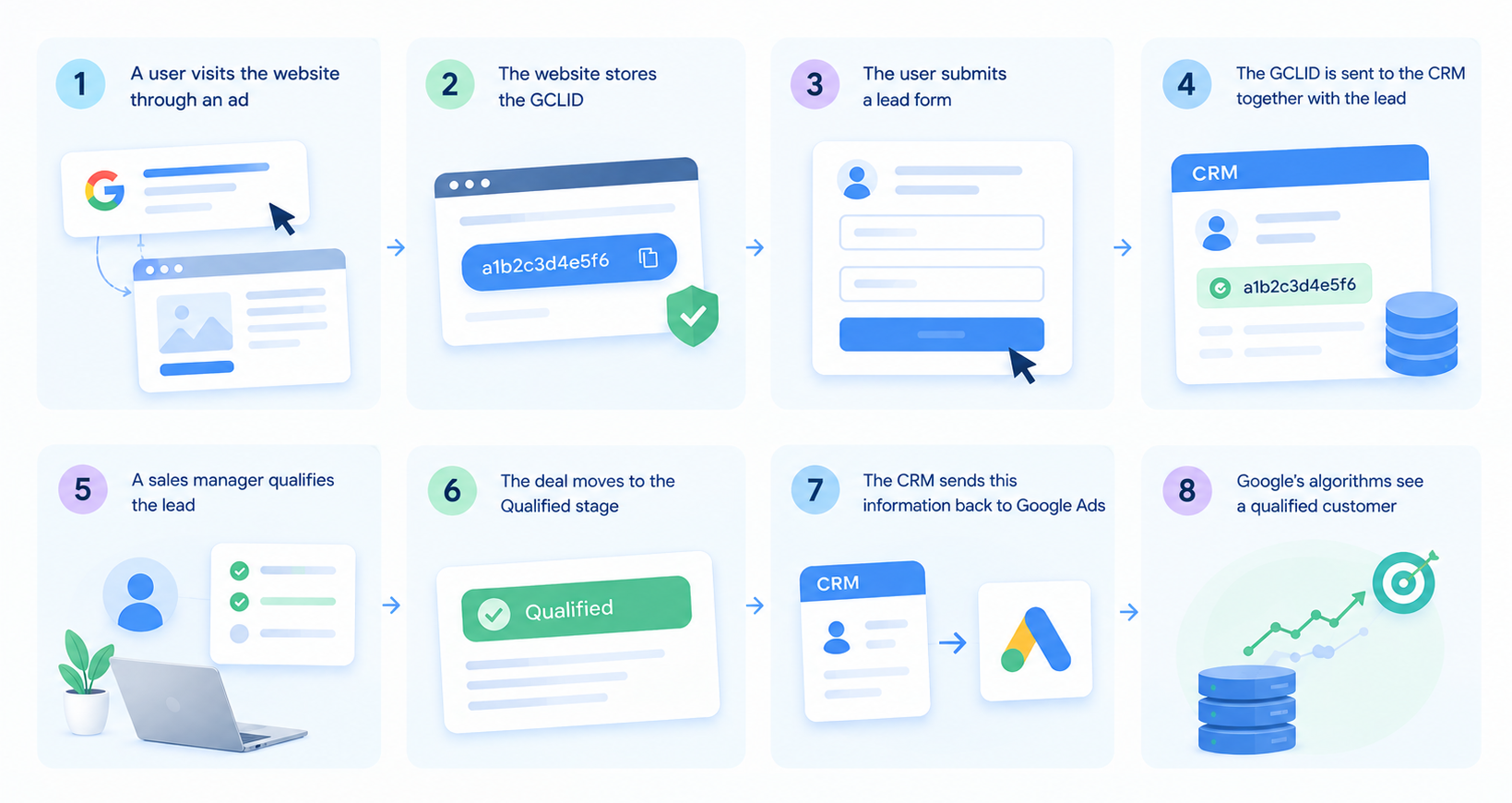
To connect this information, Google uses a special click identifier called GCLID (Google Click ID). When a user visits your website through a Google Ads ad, the system adds a unique GCLID parameter to the URL. If that identifier is properly stored in the CRM when the lead is created, you can later send information about the outcome of that lead back to Google Ads.
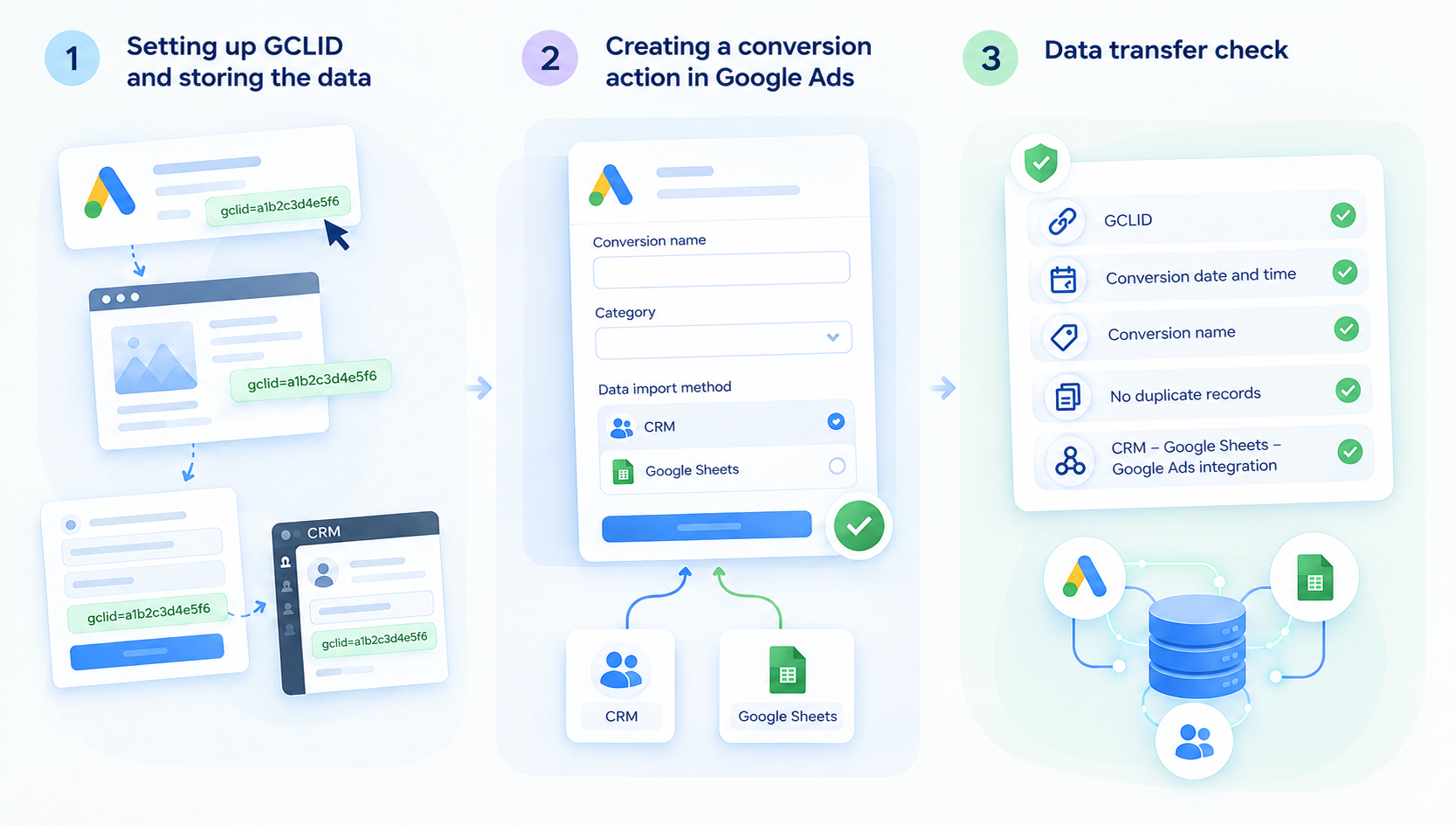
The process can look like this:
Online and offline conversions measure different stages of the same customer journey.
Online conversions are actions that happen directly on the website. These may include downloading a file, registering, submitting a form, calling from the website, or completing a purchase in an online store. Such actions can be tracked in Google Analytics 4 (GA4) or directly in Google Ads. For deeper analysis of user behavior and future actions, you can also use predictive analytics in GA4.
However, online conversions do not always reflect the true effectiveness of advertising campaigns. This is especially relevant for industries such as B2B, real estate, healthcare, legal services, automotive, local service businesses, IT, and other sectors where purchase decisions are not made immediately.
In these industries, weeks or even months may pass between the initial inquiry and the final sale. To evaluate advertising performance more accurately, it is important to analyze Google Ads data correctly and use relevant reports. For online stores, the best Google Ads reports for online stores can help provide that additional context.
This is where offline conversion tracking in Google Ads becomes especially valuable. Two leads may look exactly the same to the advertising system, but for the business, the difference between them can be significant. One person may simply ask about the price of a service and then stop responding to calls, while another becomes a paying customer.
Without that downstream information, Google treats both leads as equally successful and optimizes based on only part of the customer journey. You can solve this problem by sending offline conversion data to Google Ads about what happened later in the customer journey back to the advertising platform.
For this reason, businesses should evaluate Google Ads not only by lead volume but also by the quality of the leads those campaigns generate.
One of the biggest advantages of offline conversions in Google Ads is that they allow automated bidding strategies to learn from more relevant data. Instead of telling Google only that a form was submitted, you can show whether that lead was qualified, moved further through the sales funnel, or resulted in a sale.
This matters because Smart Bidding learns from the conversion actions you define. If the campaign only tracks form submissions, Google will optimize toward users who are likely to submit forms, regardless of whether those leads are valuable to the business. On the other hand, when offline leads or successfully closed deals are imported into Google Ads, the system starts identifying users whose behavior is similar to that of people who have already generated revenue for the business.
In practice, the algorithm stops optimizing only for lead volume and begins taking lead quality into account as well. This is how offline conversion optimization in Google Ads can help attract users who are more likely to become customers.
Over time, this can improve campaign performance. The results are not immediate, of course, as Google needs time to collect enough data. But once the system receives a consistent flow of information about qualified leads or sales, automated bidding strategies can optimize much more accurately.
For many companies, an effective solution is to automatically import offline conversions into Google Ads through Google Sheets. At Livepage, this is one of the approaches we commonly use when connecting Google Ads with a CRM.
Here is how the process typically works:
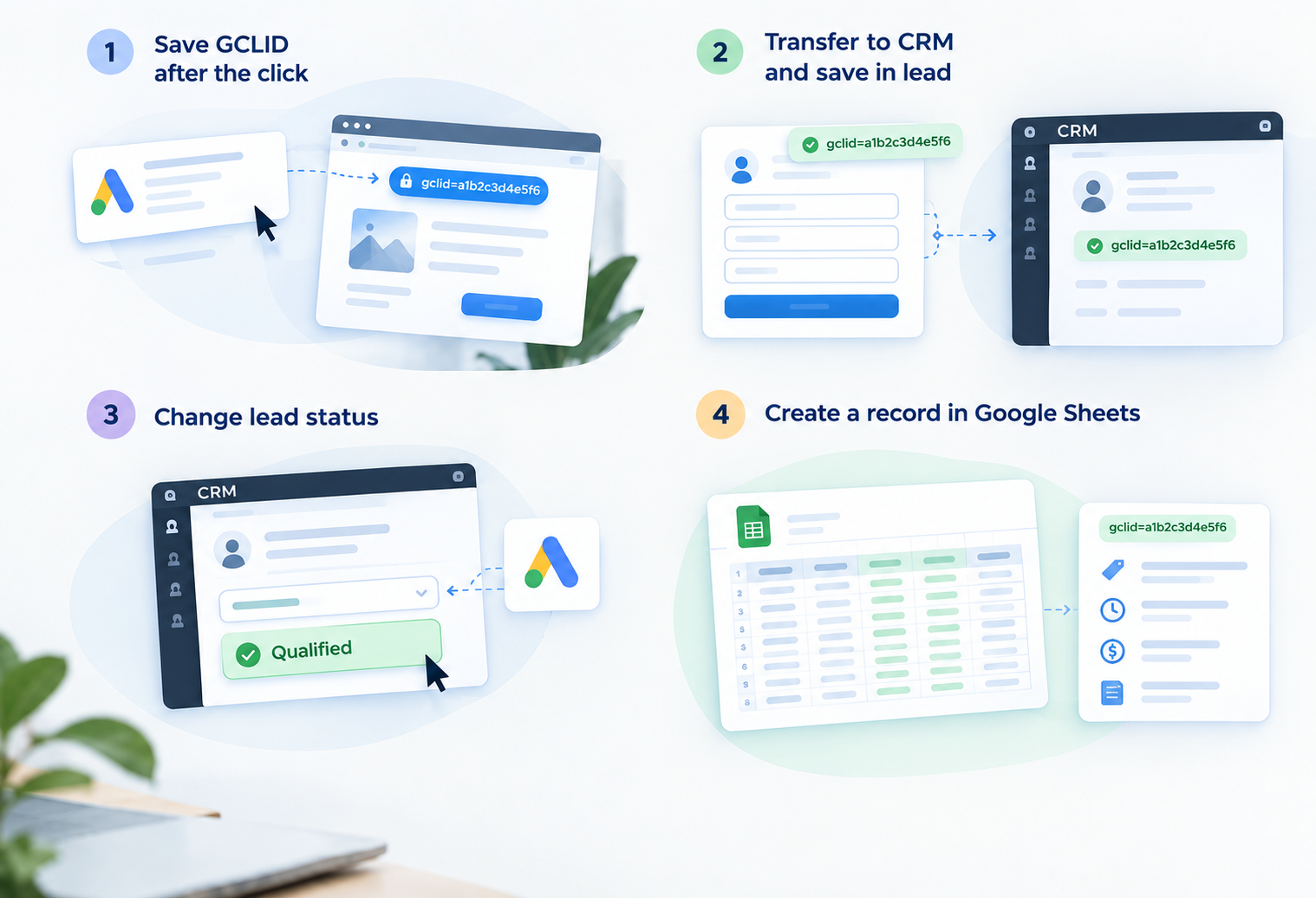
As a result, Google receives information not simply that a new lead was generated, but that the lead became qualified or resulted in a successful sale.
If a company uses HubSpot as its CRM, offline conversion imports into Google Ads can be automated. When a lead status changes, HubSpot prepares the data required for offline conversion import in Google Ads. This makes it possible to send information about qualified leads or completed sales without manually exporting data and helps keep conversion information in the Google Ads account up to date.
For companies that use other CRM systems or have custom business processes, offline conversion tracking can be implemented through an API or server-side tracking. This approach also helps reduce data loss caused by browser restrictions and cookie limitations. You can learn more about analytics in a changing cookie environment in our cookieless web analytics guide.
This setup makes it possible to automate the transfer of offline conversion data to Google Ads directly between systems. The specific integration method is developed individually based on the system architecture and project requirements.
For Google Ads to learn from real sales, simply sending CRM data is not enough. It is important to make sure the information is transferred correctly at every stage, from the ad click to the moment the lead status changes.
Let’s look at the main steps.
When a user visits your website through a Google Ads ad, the system automatically assigns that visit a unique GCLID. This identifier helps Google Ads understand which advertising click led to the inquiry and, later, to the sale.
To understand how offline conversions work in practice, it is important to follow the entire data journey, from the first ad click to the point when the lead becomes qualified or turns into a customer.
That is why preserving the GCLID is critical. It should be passed to the CRM together with the lead and stored there until the lead becomes qualified or converts into a customer. If the GCLID is lost, Google Ads will no longer be able to connect the final sale with the specific ad click that generated it.
The next step is to create a conversion action in Google Ads that will receive data about qualified leads or completed sales.
During setup, you need to specify the conversion name, category, and data import method. It is important that the conversion name in Google Ads exactly matches the name being sent from the CRM or Google Sheets. Otherwise, the system may not process the imported data correctly.
Setting up offline conversions in Google Ads requires careful attention to field matching and technical parameters at every stage of the integration.
Once the setup is complete, make sure the information is being transferred successfully to Google Ads.
Before enabling automated bidding strategies, we recommend checking:
Even a single error can result in some data failing to reach Google Ads or being processed incorrectly.
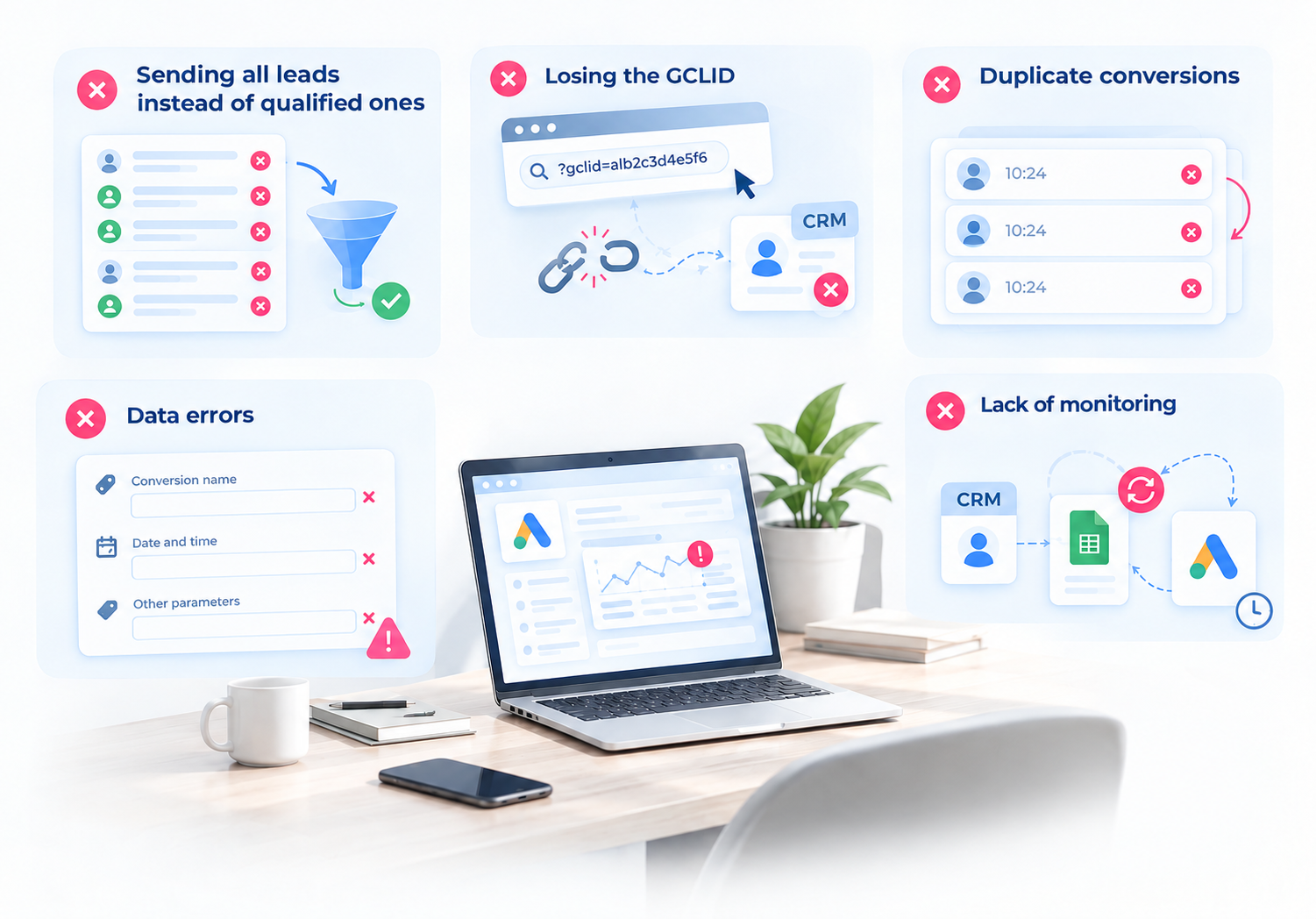
Most problems occur not during the Google Ads setup itself but during the data transfer process. Here are some of the most common mistakes when tracking offline leads in Google Ads:
Offline conversions help bring Google Ads performance closer to real business results.
Instead of measuring success only by form submissions, businesses can connect advertising data with qualified leads, closed deals, and real customers. That gives Google better information to learn from and makes campaign optimization more closely aligned with actual business goals.
At Livepage, we treat offline conversion tracking as a bridge between marketing and sales data. That makes it possible to optimize campaigns for more than inquiries and focus instead on attracting customers who create real value for the business.


“Livepage has proven to be a reliable source for rapid online growth. We started with 2,000 visitors per month. In 3 years together with Livepage we have reached 70,000 visitors and more than 100 leads from the site per month.”


“As for the results, we’ve been working together since 2015, and our traffic has increased 10x. I cannot say that Livepage was our first SEO company, but they have become the first SEO partner that helped us to achieve the success we were looking for.”


“Livepage delivers SEO efforts that have led to an increase in the site’s users, traffic, and conversions. The team uses a wide range of tools to achieve the client’s goals. They are attentive to the client’s needs, working with them in real-time and bringing in additional specialists when needed.”


“I am pleased with the quick task execution and the instant replies to my messages.”


“I like the complex approach that the Livepage team offers. Absolutely all team members work together; everyone is aware of what is happening on the project. We have one common goal – to increase our service sales, and the team is making every effort to achieve the goal as soon as possible.”


“We’ve been really impressed by how Livepage quickly understood our business and centred our PPC campaign around our objectives. We have achieved good results within a very short time in both revenue and ROI.”


“Everything is clear, timely, and understandable.”


“They have leveraged ideal opportunities to reach our business goals.”